AI agents

AI agents that answer from your content, file every lead in the CRM and hand over to a person

An EmailPro AI agent answers visitors on your website, on WhatsApp, Messenger and Instagram from your web pages, your whole site, or pasted text such as a price list. It writes every lead into the CRM with the full conversation, hands over to a person when asked or when it has no answer, and acts only within the tools you ticked. It runs on your own AI provider key, or on ours while you start.

0% markup
on tokens when the agent runs on your own provider key: you pay the provider directly
1 to 50
actions per conversation, a ceiling you set; the policy layer stops the agent when it is reached
3 languages
for the safety rehearsal that tries to misuse your agent before it goes live: English, Hebrew and Spanish

What can an EmailPro AI agent do?

Answering is the easy part. What makes an agent useful to a business is what happens to the conversation afterwards.

Answer from your own content

Add a web page by its address, your whole website, or pasted text such as a price list or an FAQ. The agent searches them for each question and answers from what it finds; when nothing fits, it says so and offers a person instead of guessing a price.

Capture leads into the CRM

A visitor who leaves details becomes a contact and a lead marked as coming from the assistant, with the transcript attached. Every automation you built for new leads fires as it would for a form.

Hand over to a person

When a visitor asks for a human, wants to continue on WhatsApp or the agent has no answer, the conversation goes to your team with its full history, and the owner is notified.

Use tools you allow

An agent's tools are the same actions the MCP server offers, such as checking a booking slot, plus HTTP tools you connect. It holds only the tools you ticked, and a write needs the visitor's confirmation first.

Verify a deal by voice

Send a customer a link, they hear the deal terms and agree in their own voice. The recording and transcript are fingerprinted and stored, and a person on your team marks the agreement verified or rejected.

Work inside automations

AI steps in a flow classify a message, choose between your options, extract fields such as a budget or date, or draft a reply for a person to approve. A step gets no tools, so it can choose but never act.

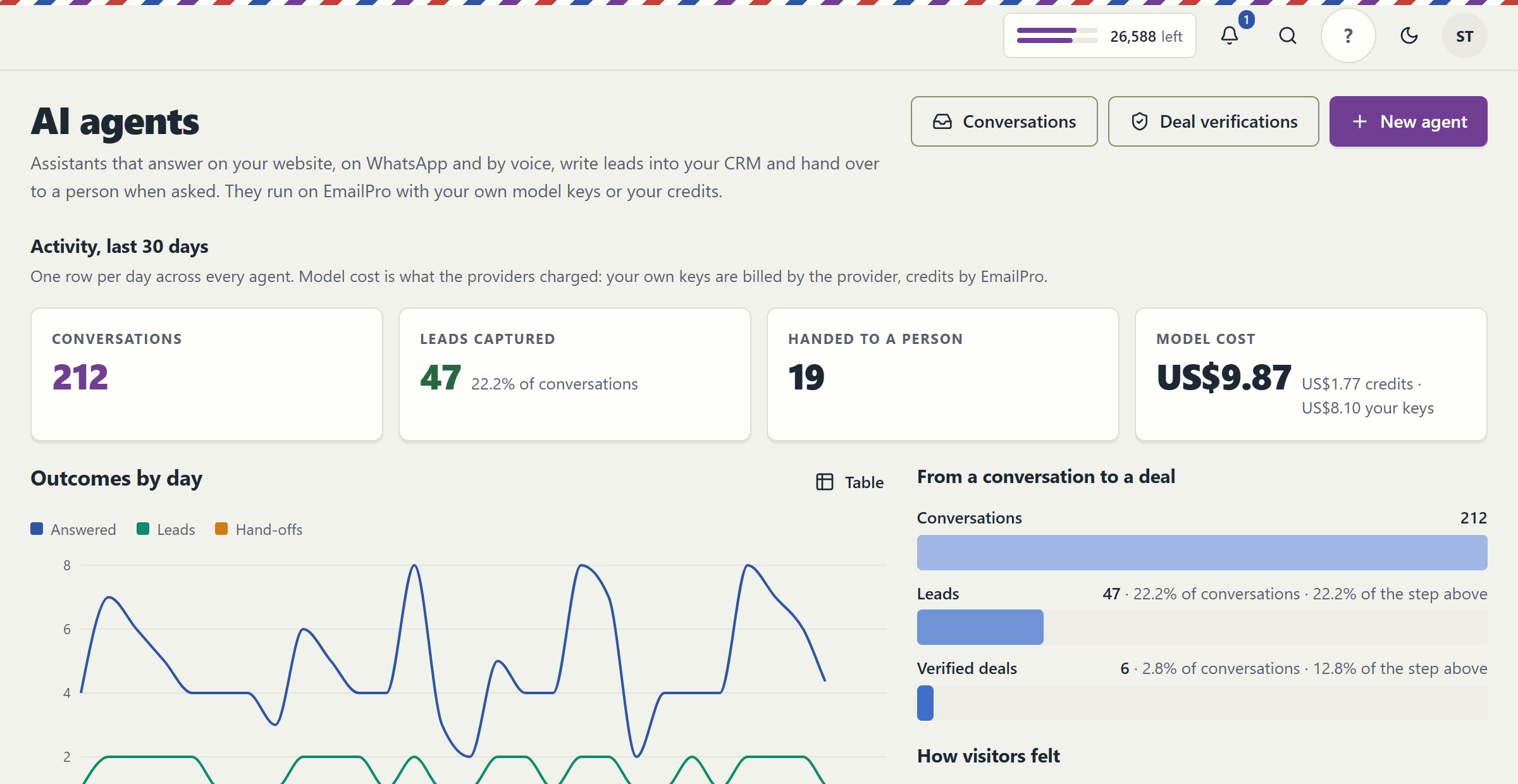
The EmailPro AI agents screen with 30-day totals for conversations, leads captured and conversations handed to a person, and a daily chart of outcomes
The agents screen: conversations, leads captured and hand-offs to a person over the last 30 days. Real EmailPro screen with example data; the names and numbers are not a customer's.

What does the policy layer check before an agent acts?

With your own key, the model that answers is your choice. So nothing that matters rests on the model behaving: the model proposes a tool call, and the platform decides from facts the model cannot change.

CheckWhat it preventsWhere you see it
The tool is one you tickedAn agent using a capability you never gave itThe decision log, with the refused call and its reason
The action ceiling for this conversationAn agent looping through dozens of actionsThe conversation trace
The visitor confirmed before a writeA booking or record change nobody asked forThe transcript and the decision log
The input scored as an injection attemptInstructions hidden in a message or a document taking overThe decision log, with the score
Card numbers in the replyA payment card repeated back into a chatThe reply, with the number removed

The decision log keeps 30 days of what the agent saw, which model answered on whose key, what it asked for and what the policy said.

How do you launch an AI agent on your website?

  1. Choose a purpose and add content

    Sales, support or bookings. Add your site, price list or frequently asked questions; changes to that content reach the agent without rebuilding it.

  2. Connect a model key, or not

    Paste a key from your AI provider and pay them directly, or start on our model and use credits from your plan.

  3. Run the rehearsal

    A fixed set of awkward visitors tries to misuse your agent in a sandbox with your real model, content and tools, and the report shows what the policy layer saw.

  4. Install and route

    Add a block on a site built with us, or one script tag elsewhere, and choose who is notified about leads and hand-offs.

Why a conversation with an agent is a business record

A chat with an assistant can contain a commitment: a price that was quoted, a date that was promised, a customer agreeing to terms. So every conversation is stored on the customer's record next to their emails and texts, and a person who takes over sees all of it, not only the last line. A conversation marked as an agreement is kept for seven years; an ordinary one is deleted after thirty days.

The agent never approves a deal, sends a campaign or deletes a contact by itself, and the same is true of an AI step inside an automation: it can classify, decide between your options or draft, but the draft goes to a person as a task. The model chooses; it does not act.

Your provider key is stored encrypted and never reaches the visitor's browser. In a voice conversation the browser receives a short-lived token and the audio goes directly to the provider. That is also why we can promise no markup on tokens: they do not pass through our bill.

When is an AI agent the wrong choice?

An agent is not always the answer, and these are the cases where it will disappoint.

There is nothing for it to learn from

An agent with no price list, no answers to common questions and no service pages answers in generalities, which is more irritating than a form. Write the content first; the agent is only as good as what it can read.

You want the agent to close deals alone

Here a person approves every deal, campaign and stage change an agent suggests. That is slower than a system that gives the bot everything, on purpose: an agent that commits your business without a person is a risk we do not sell.

You need WhatsApp or Instagram on day one

The website channel works as soon as the agent is published. Messaging channels go through Meta's official platform, which needs your business verified and Meta's review of our app, still in progress, so plan the website first.

Clear answers

AI agents: common questions

Try it on your own customers

Open an account, import a list with its consent records and connect one channel. Nothing is sent until a person approves it.

Open an account

Explore the current workspace

Build the page. Write the email. Keep the customer in context.

The builders, CRM and operational tools now share more of the journey. Start with a draft, review the next action, and follow the recorded result in the same workspace.

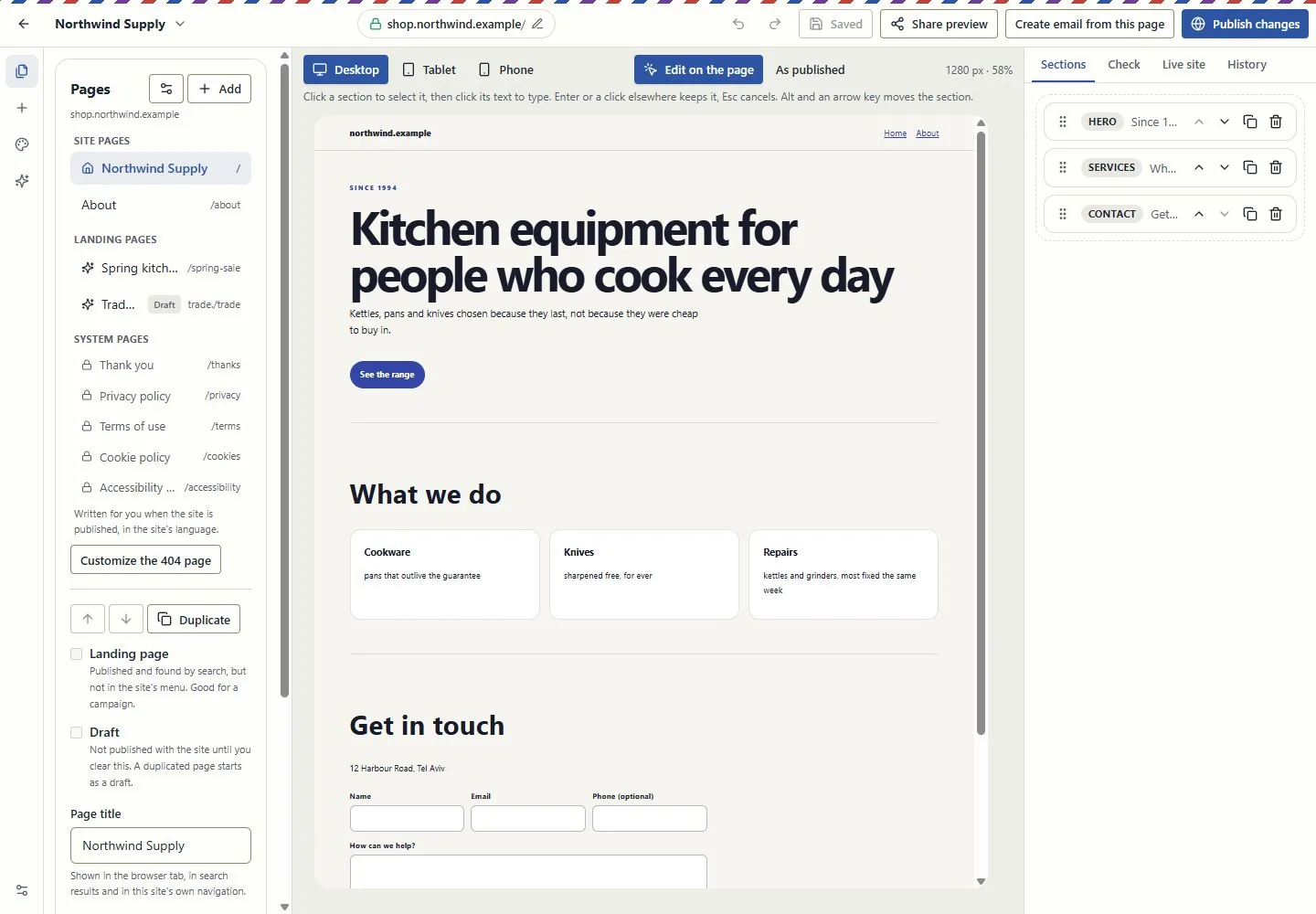
A canvas for websites and landing pages

Edit in the page itself, switch between desktop, tablet and phone, and review changes before publishing. Pages, versions and professional kits use the shared canvas in Brand My Inbox and EmailPro.

Forms can create CRM inquiries. Joining a mailing list requires a separate consent choice.

Explore this capability: A canvas for websites and landing pages
A canvas for websites and landing pages
Current EmailPro screens with demonstration data, captured 26 October 2026. Examples are not customer results.Open full-size screen: A canvas for websites and landing pages

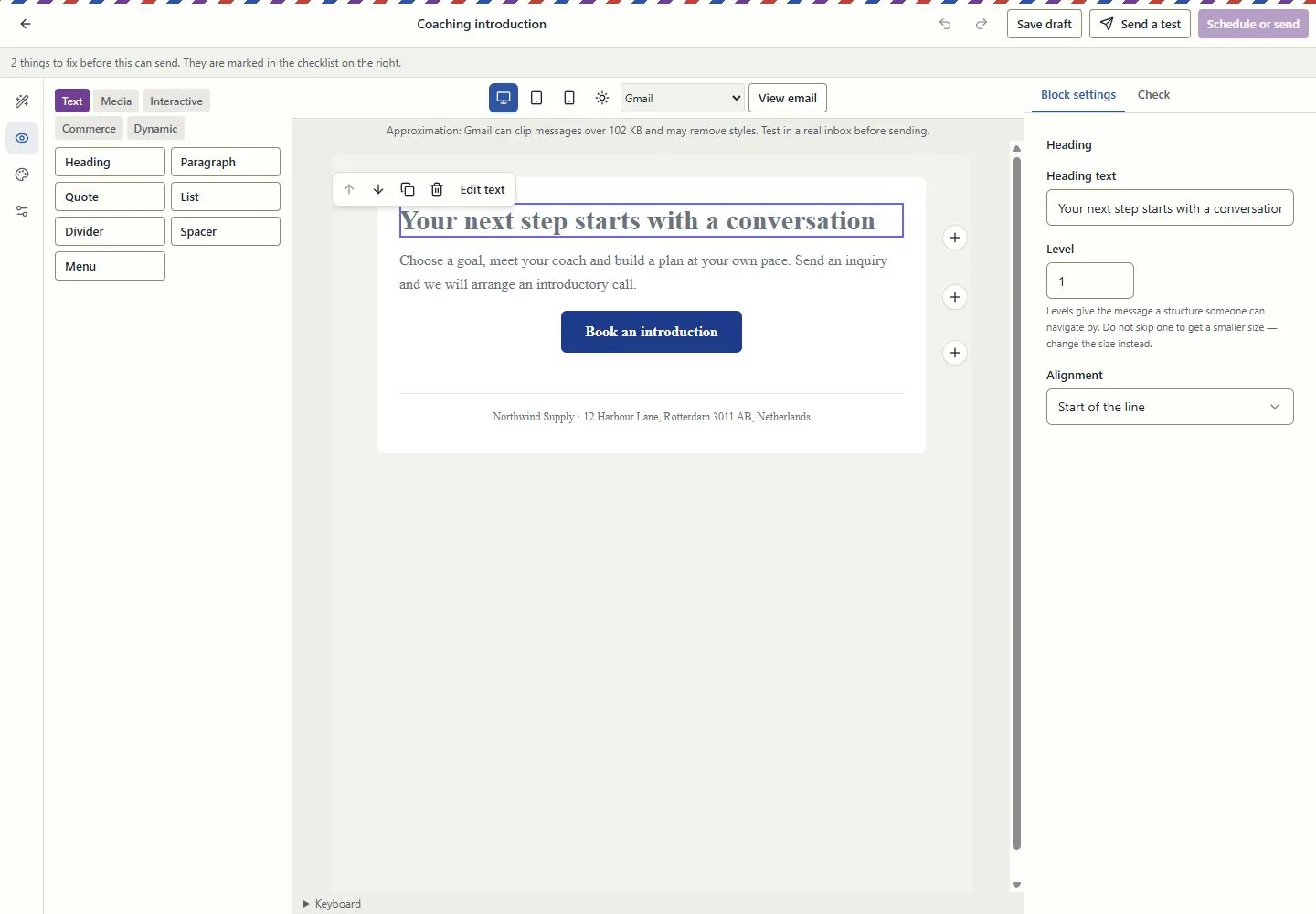
Design the email in the email itself

Work at real reading widths, edit text in the email, reorder blocks and inspect dark-mode and mail-client simulations. Keep the landing page and campaign connected through the supported conversion tools.

A simulation is not an inbox test. Review recipients, exclusions and sender identity before sending.

Explore this capability: Design the email in the email itself
Design the email in the email itself
Current EmailPro screens with demonstration data, captured 26 October 2026. Examples are not customer results.Open full-size screen: Design the email in the email itself

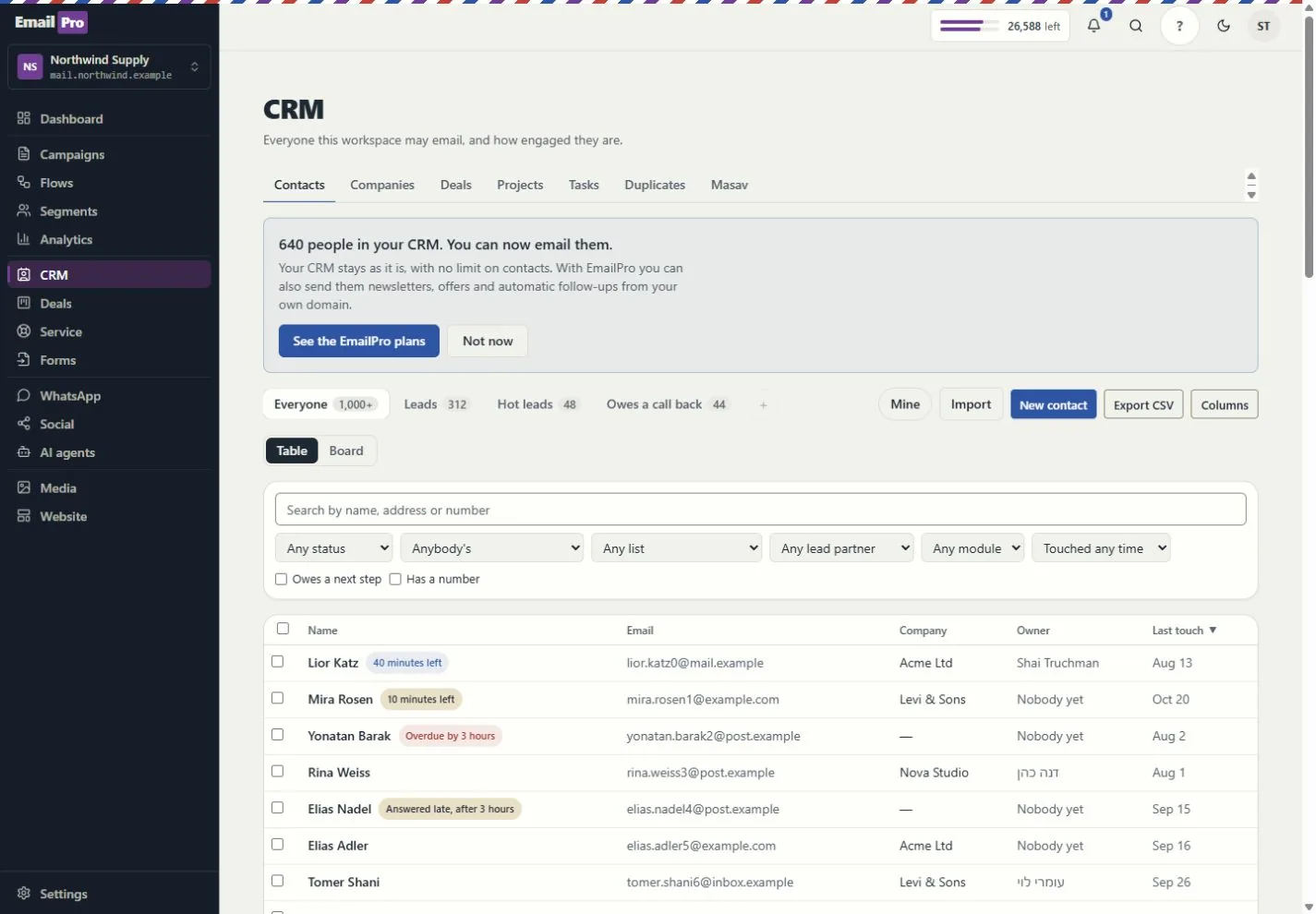
Customer work beyond a contact list

Connect contacts, companies, deals, service requests and projects. Use owners, queues, tasks, deliverables and approvals to see who does what next.

Visibility follows roles and record access. Inquiry forms do not grant marketing consent.

Explore this capability: Customer work beyond a contact list
Customer work beyond a contact list
Current EmailPro screens with demonstration data, captured 26 October 2026. Examples are not customer results.Open full-size screen: Customer work beyond a contact list
Explore the connected capabilities

What each tool does, and what needs a connection

Automations you can inspect

Build event-driven steps, review dependencies and simulation results, and inspect runs and delivery failures. Improvement proposals require review before applying a new version.

Simulation shows configured behaviour; it does not prove a provider will complete a live action.

Projects, capacity and commercial work

Track deliverables, review requests, exceptions, dated hours and retainer periods. Compare assignment and deadline scenarios before changing the project.

Scenario results are estimates based on the recorded inputs, not guaranteed profit or capacity.

Shared knowledge with access boundaries

Give assistants approved company and project context. Review sources, refresh status and access rather than copying customer information into every prompt.

Answers depend on source quality and the permissions of the person asking.

Explainable actions and an operational trace

Review the proposed action, scope and cost. Follow the request, plan, approval, tool call and recorded effect; supported MCP tools use the same access rules.

Some actions remain human-only. MCP coverage is documented per tool, not promised for every screen.

Reports with a named source

Use customer journeys, campaign attribution and recorded outcomes. Search and AI visibility distinguish appearances, citations, referrals and conversions.

Google Analytics needs authorised setup; search imports and manual experiments are not live ranking or citation guarantees.

Booking inside the customer journey

Use availability, meeting pages and the coaching kits. Link an existing payment request to the appointment and keep the customer record in context.

Google Calendar and payment providers need authorisation. Linking a request does not charge the customer or make payment a booking condition.

Email quotas and SMS funding, explained

Email uses the monthly plan allowance. Israeli SMS uses verified prepaid packages; international SMS and calling use the wallet. SMS counts parts, not just recipients.

An own-provider account is separate. Provider charges and connection requirements still apply.

Connections, plugins and delivery logs

Connect supported providers, the WordPress lead plugin, Zapier or Make adapters, and signed webhooks. Inspect connection health and failed webhook deliveries.

Installation and authorisation are required. Marketplace publication is not claimed.

Workspace structure you can take with you

Export supported fields, pipelines, modules, lists, segments, templates, forms and automation definitions. Preview import compatibility before writing.

Structural export is not a full backup or a promise that every external platform can import it.

Creator and agency operations

Connect campaigns, creator codes, orders, refunds and gifting with supported store data. Keep client review, project deliverables and retainer work in the same operating context.

Store connections and client-portal access require setup and the relevant entitlement. Attribution is based on recorded data, not guaranteed sales.

Test assistants before using them

Run the supported business-task evaluations and review saved results, failures and model cost. Inspect media review and cleaning status before using uploaded content.

An internal evaluation is not an independent security audit. Media cleaning and external providers depend on the configured runtime.
Check the plan, permissions and connection requirements before activation.