Marketing automation

Marketing automation that sends the right message across email, SMS and WhatsApp, and stops at the goal

EmailPro automations start from something a customer did, such as signing up, abandoning a cart, replying on WhatsApp or having a deal won, and then wait, check conditions and send email, SMS or WhatsApp, or act in the CRM. Each automation has a goal: the moment it is met, the person leaves. Before you switch one on, you see how often it would have run on your own history.

50+
triggers, from a signup or an abandoned cart to a won deal, a late ticket or a failed payment
30 days
of your own history replayed before launch, to show how many people an automation would have reached
Every save
of a live automation is a numbered version you can roll back to, while people already inside keep their path

What can a marketing automation do here?

One builder for marketing journeys and CRM workflows, because a customer does not care which department sent the message.

Start from real behaviour

Signups, list joins, tags, a date field such as a birthday, inactivity, purchases, abandoned carts, product views, custom events, WhatsApp replies, social messages and comments, lead scores crossing a threshold, and CRM events.

Send on three channels

A step sends an email, a text or an approved WhatsApp template, or chooses between them on a condition, for example a text only to people who did not open the email within two days.

Act in the CRM

Create a task, move a lead, open a ticket, notify the owner or create a payment link for a person to send. No step can charge a card by itself.

Stop at the goal

Set the goal, such as a purchase, a reply or a won deal, and anyone who reaches it leaves the automation. The report counts conversions with the step they were on and how long it took.

Test before it is live

Replay the trigger over the last 30 days, run the automation on a real contact as a dry run, and see what that person would receive and when.

Change without breaking

Each activation and each save of a live automation is a numbered version. People already inside finish the version they started; new entrants take the new one; rollback is one action.

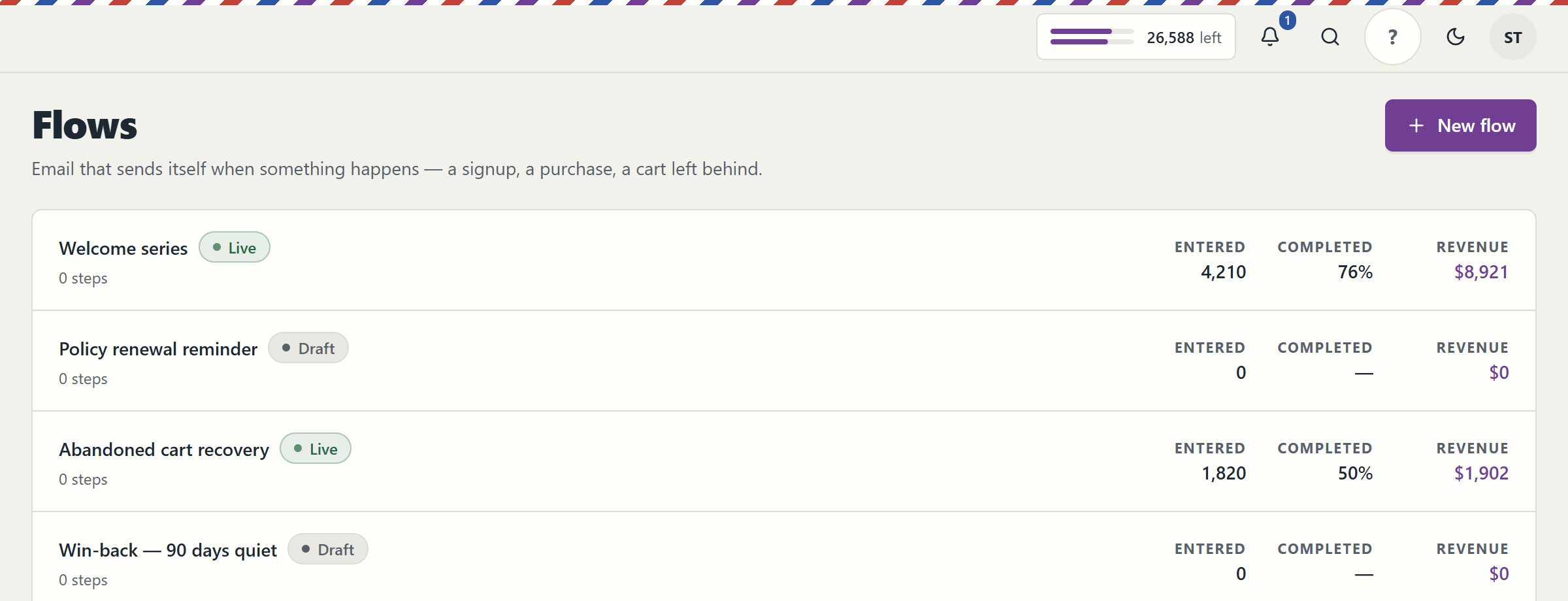
The EmailPro flows screen listing live and draft automations with the number of people who entered, the share who completed and the revenue attributed to each
Automations with how many people entered each one, the share who completed it and the revenue it brought in. Real EmailPro screen with example data; the names and numbers are not a customer's.

Which automations should you build first?

Six automations that pay back quickly, and the trigger that starts each one in the builder.

AutomationTriggerWhat it does
Welcome seriesSignup or list joinA welcome at once, an offer two days later only if they have not bought, a tip after a week
Abandoned cartA cart started and not completedA reminder after an hour, then a text to people who did not open the email
Win-backInactivity, for example 90 days without a purchase or an openOne message with a reason to return; no response means leaving the active segment
After purchaseA completed orderConfirmation, a how-to guide and a review request two weeks later
New lead follow-upA lead created from a form or an AI agentAssign an owner, create a call task, and send a WhatsApp template to leads who gave WhatsApp consent
Late ticket escalationA service ticket that breached its targetNotify the owner, add a note to the ticket and create a follow-up task

How do you build an automation in EmailPro?

  1. Describe it, or draw it

    Tell your AI assistant what you want, for example a welcome series with an offer after two days, or open the builder and add a trigger, waits, conditions and steps.

  2. Set the goal and the exits

    Choose the event that means the automation succeeded. People who reach it leave, so nobody is asked whether they are still interested a day after they paid.

  3. Simulate on your history

    See how many times it would have run in the last 30 days and for how many people, then dry-run it on a real contact.

  4. Activate and watch

    Switch it on. The report shows entries, completions, conversions and revenue, and you can pause, edit into a new version or roll back at any time.

Why versions, goals and simulation matter more than the number of templates

The common failure of marketing automation is not a missing template. It is an automation that fires nine hundred times when its author expected twice a week, an edit that changes the path of forty people already halfway through, or a reminder that reaches someone who bought yesterday. Each of those is prevented here by design rather than by care.

Simulation answers the first: before launch you see, from your own history, how often the trigger would have fired. Versions answer the second: an edit never changes a run in flight, because every person remembers the version they started on. Goals answer the third: the moment the goal is met, the person leaves.

An AI assistant can build an automation from one sentence through the MCP server, but it is saved as a draft and a person activates it. Unsubscribing removes a person from every automation at once, and the send calendar holds marketing messages at night, on Shabbat and on holidays you configure.

When is this automation builder the wrong choice?

Three situations where it will not fit, and we would rather say so here.

You need a general integration platform

This builder automates customers: messages, CRM records and the events around them. Moving data between dozens of unrelated business apps is what integration platforms do; connect them through webhooks and the API instead.

You want WhatsApp broadcasts without consent

A WhatsApp step sends only approved templates and only to contacts who opted in to WhatsApp. If most of your list never agreed, the step will skip them by design.

Nobody will look at the results

Automations run by themselves, but goals and reports only help if someone reads them each month. An automation nobody reviews keeps sending last year's offer.

Clear answers

Marketing automation: common questions

Try it on your own customers

Open an account, import a list with its consent records and connect one channel. Nothing is sent until a person approves it.

Open an account

Explore the current workspace

Build the page. Write the email. Keep the customer in context.

The builders, CRM and operational tools now share more of the journey. Start with a draft, review the next action, and follow the recorded result in the same workspace.

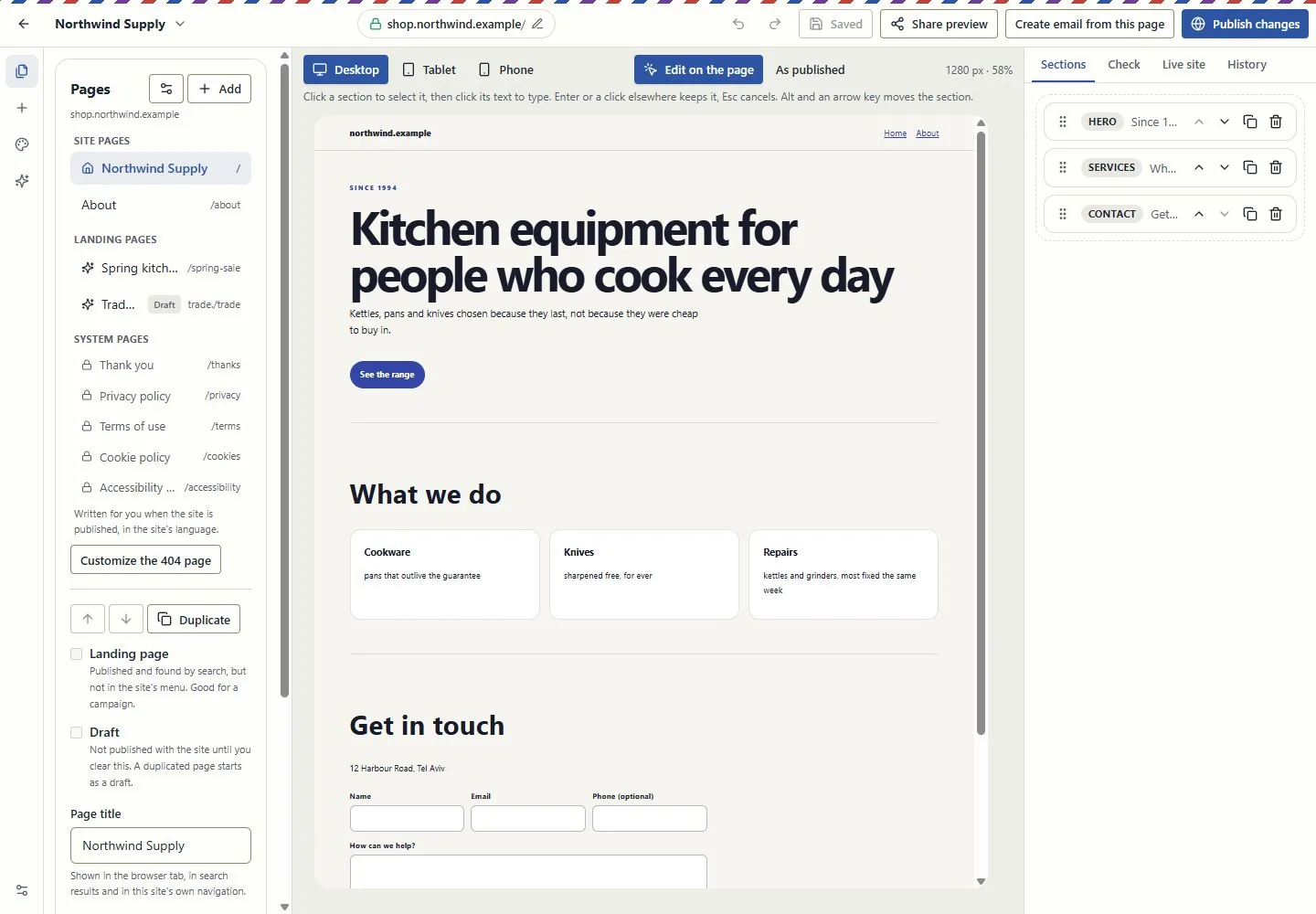
A canvas for websites and landing pages

Edit in the page itself, switch between desktop, tablet and phone, and review changes before publishing. Pages, versions and professional kits use the shared canvas in Brand My Inbox and EmailPro.

Forms can create CRM inquiries. Joining a mailing list requires a separate consent choice.

Explore this capability: A canvas for websites and landing pages
A canvas for websites and landing pages
Current EmailPro screens with demonstration data, captured 26 October 2026. Examples are not customer results.Open full-size screen: A canvas for websites and landing pages

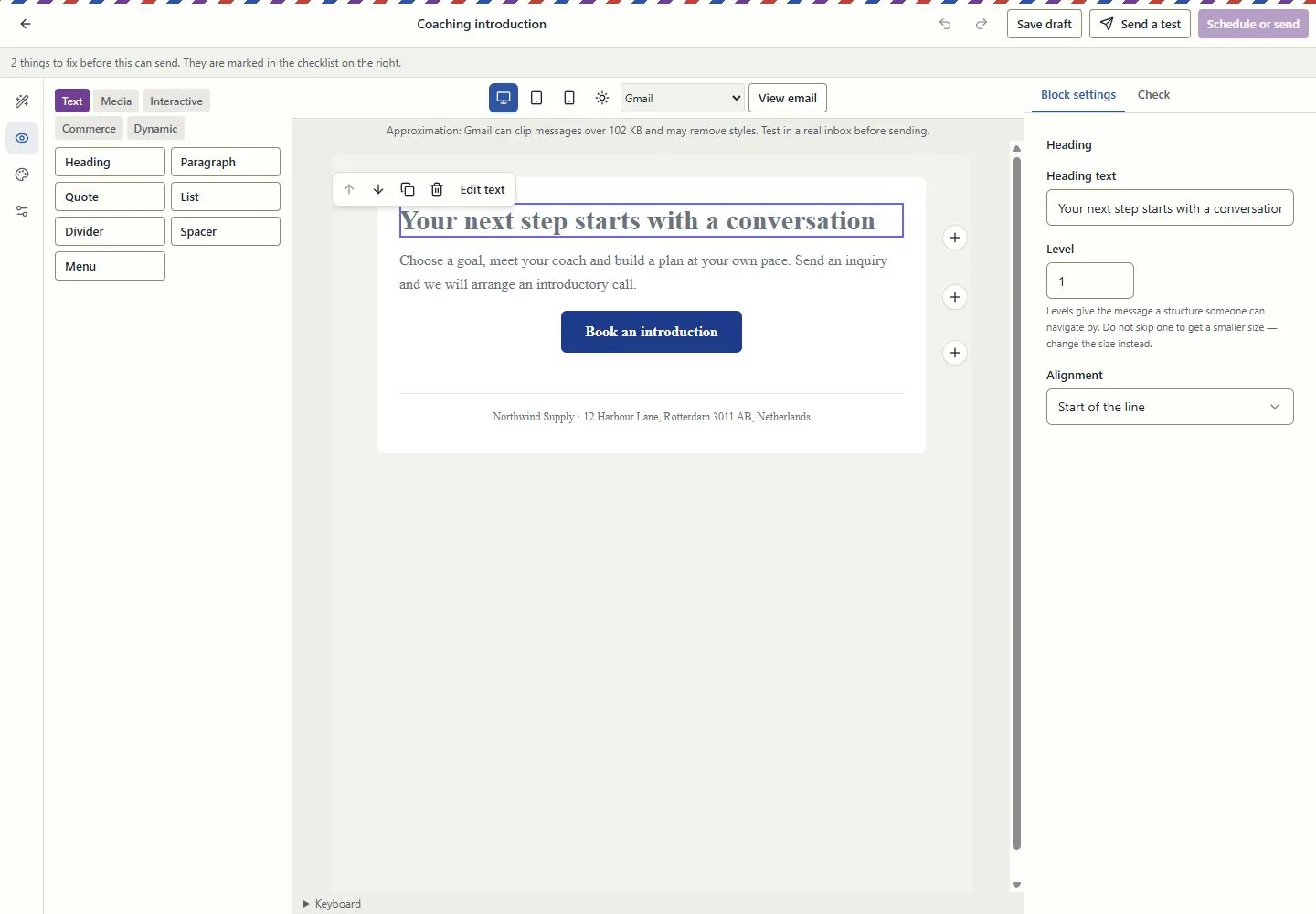
Design the email in the email itself

Work at real reading widths, edit text in the email, reorder blocks and inspect dark-mode and mail-client simulations. Keep the landing page and campaign connected through the supported conversion tools.

A simulation is not an inbox test. Review recipients, exclusions and sender identity before sending.

Explore this capability: Design the email in the email itself
Design the email in the email itself
Current EmailPro screens with demonstration data, captured 26 October 2026. Examples are not customer results.Open full-size screen: Design the email in the email itself

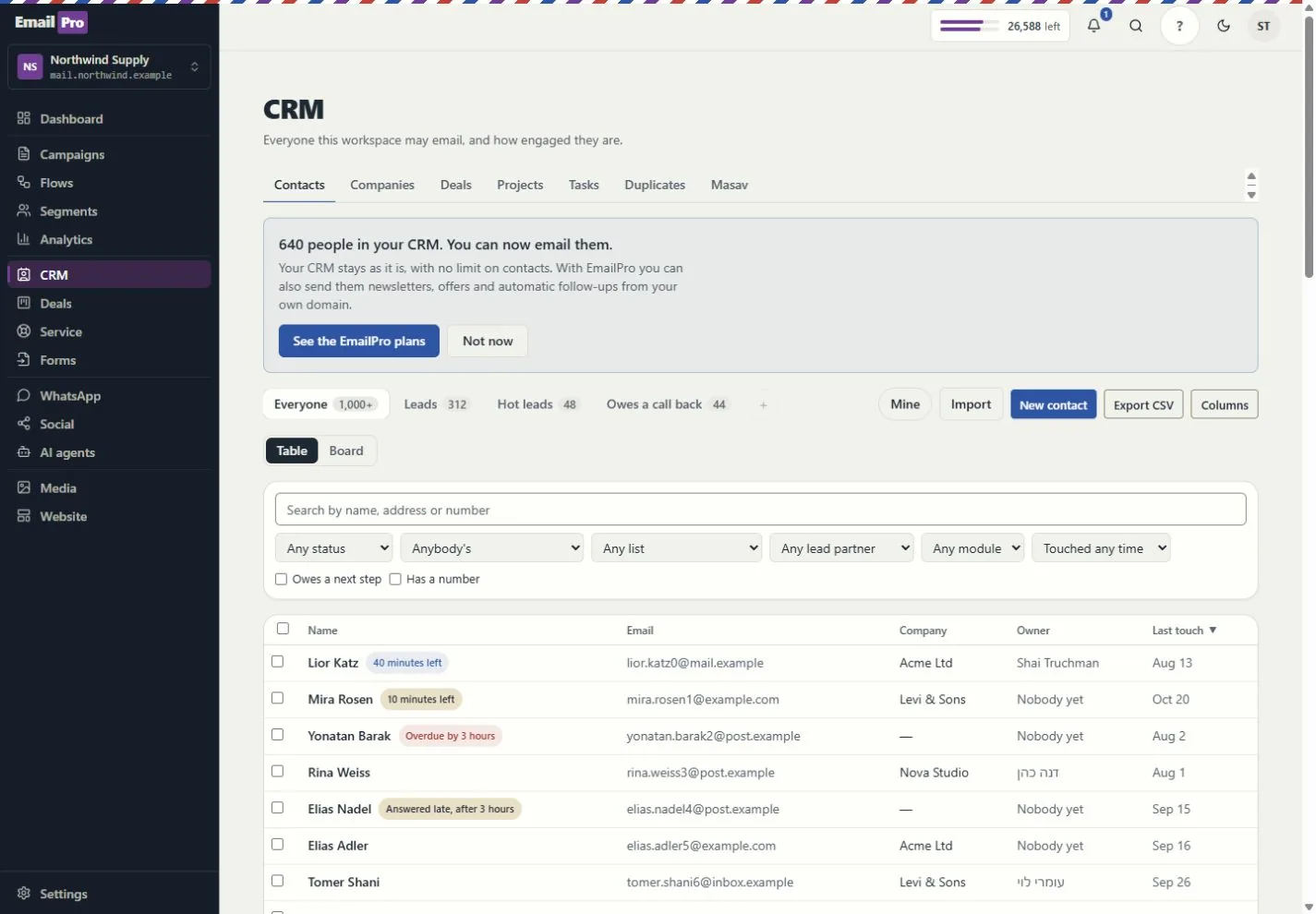
Customer work beyond a contact list

Connect contacts, companies, deals, service requests and projects. Use owners, queues, tasks, deliverables and approvals to see who does what next.

Visibility follows roles and record access. Inquiry forms do not grant marketing consent.

Explore this capability: Customer work beyond a contact list
Customer work beyond a contact list
Current EmailPro screens with demonstration data, captured 26 October 2026. Examples are not customer results.Open full-size screen: Customer work beyond a contact list
Explore the connected capabilities

What each tool does, and what needs a connection

Automations you can inspect

Build event-driven steps, review dependencies and simulation results, and inspect runs and delivery failures. Improvement proposals require review before applying a new version.

Simulation shows configured behaviour; it does not prove a provider will complete a live action.

Projects, capacity and commercial work

Track deliverables, review requests, exceptions, dated hours and retainer periods. Compare assignment and deadline scenarios before changing the project.

Scenario results are estimates based on the recorded inputs, not guaranteed profit or capacity.

Shared knowledge with access boundaries

Give assistants approved company and project context. Review sources, refresh status and access rather than copying customer information into every prompt.

Answers depend on source quality and the permissions of the person asking.

Explainable actions and an operational trace

Review the proposed action, scope and cost. Follow the request, plan, approval, tool call and recorded effect; supported MCP tools use the same access rules.

Some actions remain human-only. MCP coverage is documented per tool, not promised for every screen.

Reports with a named source

Use customer journeys, campaign attribution and recorded outcomes. Search and AI visibility distinguish appearances, citations, referrals and conversions.

Google Analytics needs authorised setup; search imports and manual experiments are not live ranking or citation guarantees.

Booking inside the customer journey

Use availability, meeting pages and the coaching kits. Link an existing payment request to the appointment and keep the customer record in context.

Google Calendar and payment providers need authorisation. Linking a request does not charge the customer or make payment a booking condition.

Email quotas and SMS funding, explained

Email uses the monthly plan allowance. Israeli SMS uses verified prepaid packages; international SMS and calling use the wallet. SMS counts parts, not just recipients.

An own-provider account is separate. Provider charges and connection requirements still apply.

Connections, plugins and delivery logs

Connect supported providers, the WordPress lead plugin, Zapier or Make adapters, and signed webhooks. Inspect connection health and failed webhook deliveries.

Installation and authorisation are required. Marketplace publication is not claimed.

Workspace structure you can take with you

Export supported fields, pipelines, modules, lists, segments, templates, forms and automation definitions. Preview import compatibility before writing.

Structural export is not a full backup or a promise that every external platform can import it.

Creator and agency operations

Connect campaigns, creator codes, orders, refunds and gifting with supported store data. Keep client review, project deliverables and retainer work in the same operating context.

Store connections and client-portal access require setup and the relevant entitlement. Attribution is based on recorded data, not guaranteed sales.

Test assistants before using them

Run the supported business-task evaluations and review saved results, failures and model cost. Inspect media review and cleaning status before using uploaded content.

An internal evaluation is not an independent security audit. Media cleaning and external providers depend on the configured runtime.
Check the plan, permissions and connection requirements before activation.