Brand My Inbox

Build a website and landing pages that connect to your CRM

Build and edit websites with AI, responsive previews and professional kits. Connect forms to CRM, review changes and publish on your configured domain.

Open your workspace

Explore the current workspace

Build the page. Write the email. Keep the customer in context.

The builders, CRM and operational tools now share more of the journey. Start with a draft, review the next action, and follow the recorded result in the same workspace.

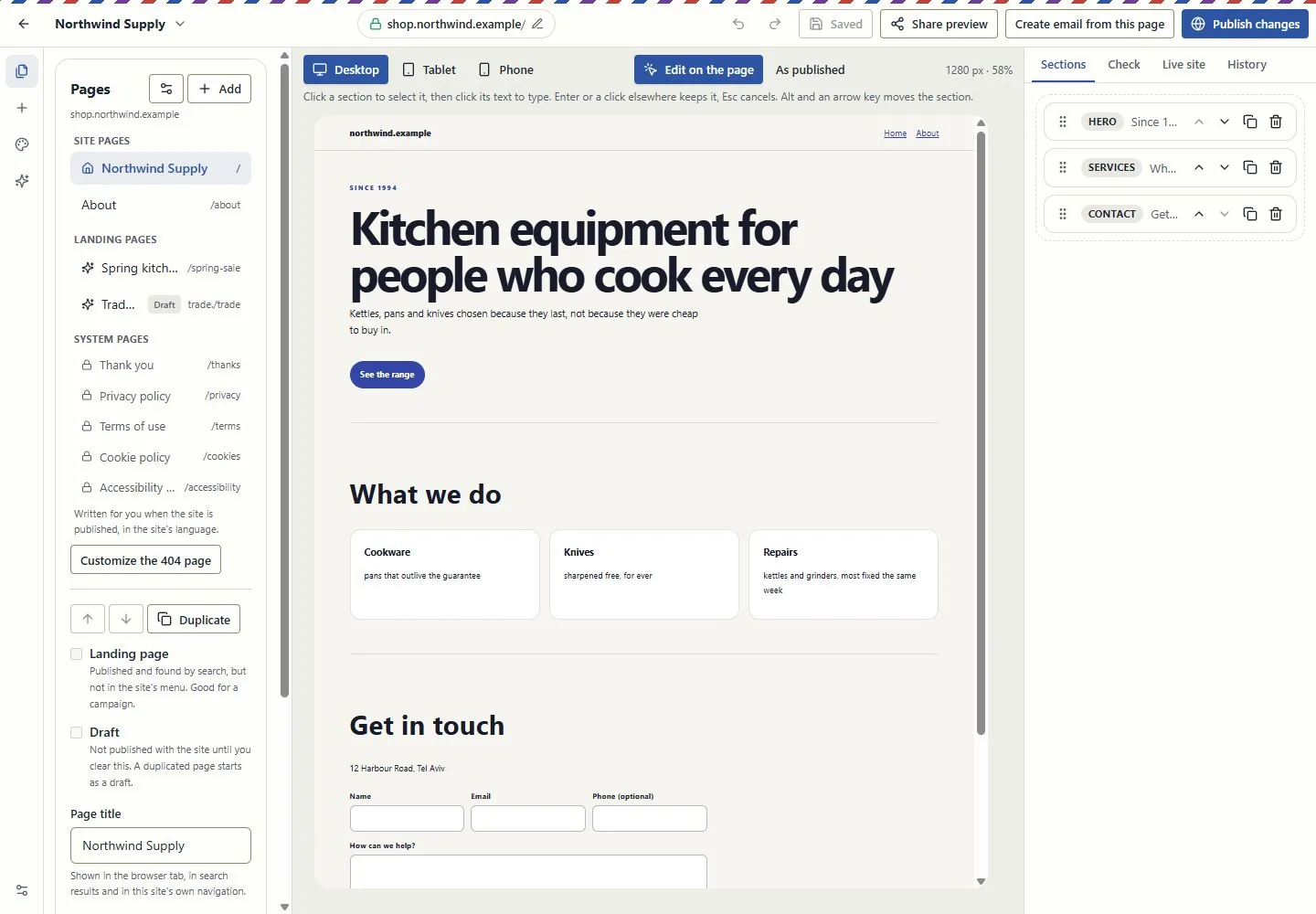
A canvas for websites and landing pages

Edit in the page itself, switch between desktop, tablet and phone, and review changes before publishing. Pages, versions and professional kits use the shared canvas in Brand My Inbox and EmailPro.

Forms can create CRM inquiries. Joining a mailing list requires a separate consent choice.

Explore this capability: A canvas for websites and landing pages
A canvas for websites and landing pages
Current EmailPro screens with demonstration data, captured 26 October 2026. Examples are not customer results.Open full-size screen: A canvas for websites and landing pages

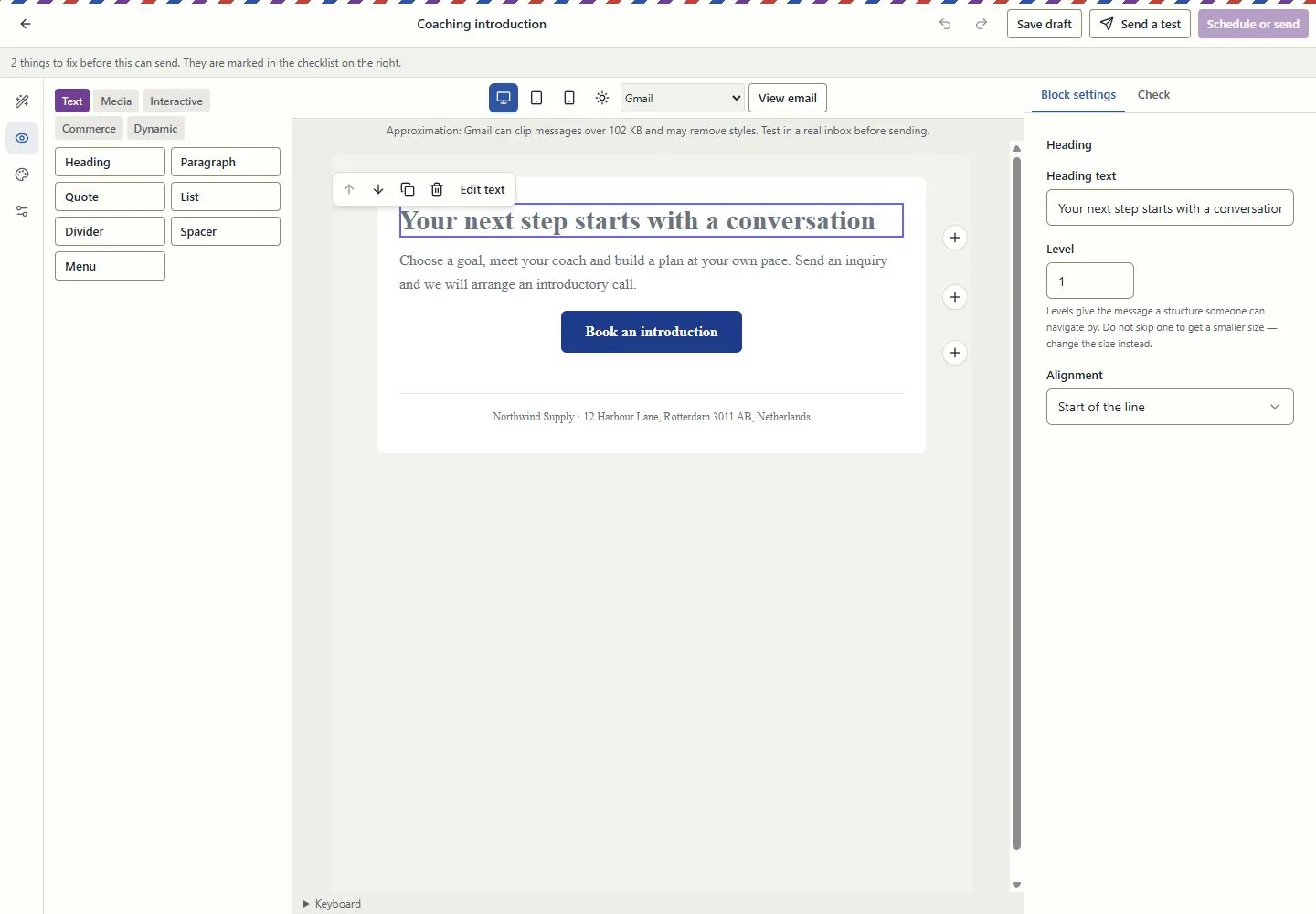
Design the email in the email itself

Work at real reading widths, edit text in the email, reorder blocks and inspect dark-mode and mail-client simulations. Keep the landing page and campaign connected through the supported conversion tools.

A simulation is not an inbox test. Review recipients, exclusions and sender identity before sending.

Explore this capability: Design the email in the email itself
Design the email in the email itself
Current EmailPro screens with demonstration data, captured 26 October 2026. Examples are not customer results.Open full-size screen: Design the email in the email itself

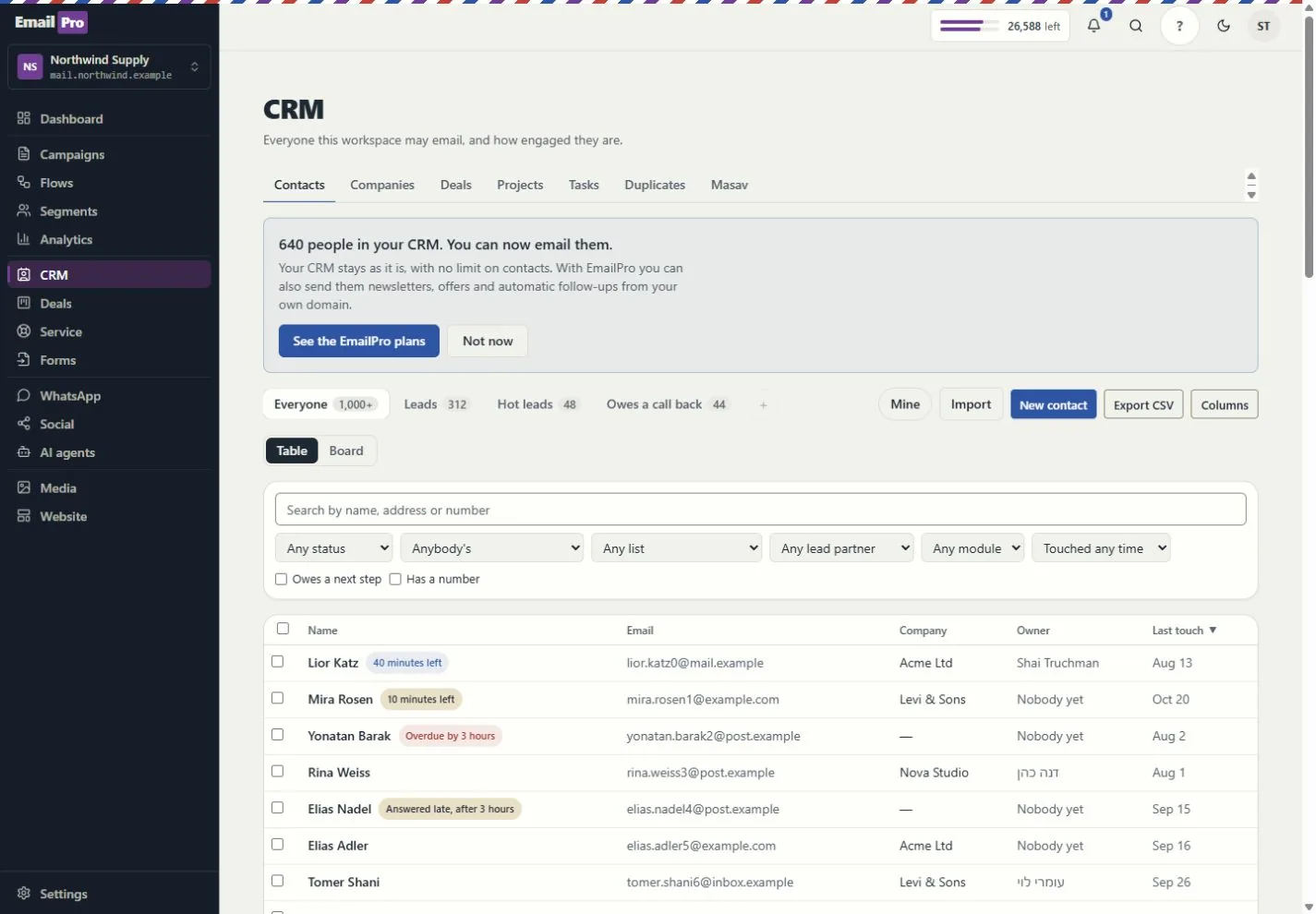
Customer work beyond a contact list

Connect contacts, companies, deals, service requests and projects. Use owners, queues, tasks, deliverables and approvals to see who does what next.

Visibility follows roles and record access. Inquiry forms do not grant marketing consent.

Explore this capability: Customer work beyond a contact list
Customer work beyond a contact list
Current EmailPro screens with demonstration data, captured 26 October 2026. Examples are not customer results.Open full-size screen: Customer work beyond a contact list
Explore the connected capabilities

What each tool does, and what needs a connection

Automations you can inspect

Build event-driven steps, review dependencies and simulation results, and inspect runs and delivery failures. Improvement proposals require review before applying a new version.

Simulation shows configured behaviour; it does not prove a provider will complete a live action.

Projects, capacity and commercial work

Track deliverables, review requests, exceptions, dated hours and retainer periods. Compare assignment and deadline scenarios before changing the project.

Scenario results are estimates based on the recorded inputs, not guaranteed profit or capacity.

Shared knowledge with access boundaries

Give assistants approved company and project context. Review sources, refresh status and access rather than copying customer information into every prompt.

Answers depend on source quality and the permissions of the person asking.

Explainable actions and an operational trace

Review the proposed action, scope and cost. Follow the request, plan, approval, tool call and recorded effect; supported MCP tools use the same access rules.

Some actions remain human-only. MCP coverage is documented per tool, not promised for every screen.

Reports with a named source

Use customer journeys, campaign attribution and recorded outcomes. Search and AI visibility distinguish appearances, citations, referrals and conversions.

Google Analytics needs authorised setup; search imports and manual experiments are not live ranking or citation guarantees.

Booking inside the customer journey

Use availability, meeting pages and the coaching kits. Link an existing payment request to the appointment and keep the customer record in context.

Google Calendar and payment providers need authorisation. Linking a request does not charge the customer or make payment a booking condition.

Email quotas and SMS funding, explained

Email uses the monthly plan allowance. Israeli SMS uses verified prepaid packages; international SMS and calling use the wallet. SMS counts parts, not just recipients.

An own-provider account is separate. Provider charges and connection requirements still apply.

Connections, plugins and delivery logs

Connect supported providers, the WordPress lead plugin, Zapier or Make adapters, and signed webhooks. Inspect connection health and failed webhook deliveries.

Installation and authorisation are required. Marketplace publication is not claimed.

Workspace structure you can take with you

Export supported fields, pipelines, modules, lists, segments, templates, forms and automation definitions. Preview import compatibility before writing.

Structural export is not a full backup or a promise that every external platform can import it.

Creator and agency operations

Connect campaigns, creator codes, orders, refunds and gifting with supported store data. Keep client review, project deliverables and retainer work in the same operating context.

Store connections and client-portal access require setup and the relevant entitlement. Attribution is based on recorded data, not guaranteed sales.

Test assistants before using them

Run the supported business-task evaluations and review saved results, failures and model cost. Inspect media review and cleaning status before using uploaded content.

An internal evaluation is not an independent security audit. Media cleaning and external providers depend on the configured runtime.
Check the plan, permissions and connection requirements before activation.

Edit the actual page

Edit text in place, rearrange sections, preview phone and desktop widths, recover draft changes and restore a saved version.

Keep your address connected

Check DNS and HTTPS, manage redirects and prepare a custom 404. Website records and sending records serve different purposes.

Connect pages and campaigns

In EmailPro, convert a campaign to a landing page or a page to an email draft. Review the report of blocks that cannot be converted.

Give every enquiry a next step

Carry campaign attribution into the CRM. Choose an active automation, a team notification or a deal pipeline after form submission.

Bring your AI assistant

Use MCP to prepare HTML uploads, read site checks and work with drafts. A prepared upload is a preview; publishing remains a separate approval.

Write for your audience

Use Hebrew or English page copy, translated starter templates and device previews. The page language controls reading direction.

Review, then publish

Check the content, address, consent settings and business details. Generated legal pages are templates that require review for your business. Live screenshot checks require a configured browser connection.

One connected platform

From a visitor to a customer, with the work connected.

Your website, forms, CRM, campaigns and automations work in the same workspace. Use the screens or connect an MCP assistant to the supported tools, with the same access rules.

  1. Capture the inquiry

    A website or landing-page form creates a CRM inquiry. Joining a marketing list requires a separate consent choice.

  2. Assign and follow up

    Use owners, tasks, deal stages and configured automations to track the next action. Connect booking when the customer needs a meeting.

  3. Review, approve and measure

    Review the draft before publishing or sending. Reports show recorded delivery and customer activity; provider data requires an authorised connection.

Automations and follow-up

Build event-triggered flows with conditions and delays. Review the draft and sending rules before enabling it.

Email, audiences and consent

Prepare campaigns, segments and signup forms in EmailPro. The free plan includes 1,800 emails a month and up to 500 contacts.

Appointments, calendars and payments

Connect an existing booking page, configure availability and authorise Google Calendar. A reviewed CRM payment request can be linked to the same customer’s appointment; linking does not charge automatically.

AI agents and shared knowledge

Give assistants reviewed business knowledge and configured tools. Keep customer conversations in context and test the agent before release.

Integrations and connection health

Connect supported store, calendar and analytics providers with their required permissions. Inspect each connection; an available adapter is not an active account connection.

Plugins and external workflows

Use the WordPress lead plugin with supported form builders, or configure the Zapier and Make adapters and signed webhooks. These require installation and authorisation; marketplace publication is not claimed.

Media and reusable content

Reuse uploaded assets and prepared content across your site, landing pages and campaign drafts. Review each placement before publishing.

MCP tools for your assistant

Connect a compatible assistant to the documented tools. It can inspect and prepare supported actions under your permissions; human-only approvals remain in the product.

Professional starter kits, ready to adapt

Choose a kit for services, clinics, contractors, restaurants, shops, consultants, real estate, creators or personal, fitness and career coaching. Each starts with an editable site, a campaign-page draft and industry CRM setup.

Installed site content is available in Hebrew and English. Review business details, forms, consent wording, destination lists and draft automations. Calendar, payment and store connections require separate setup; the kits do not include a native checkout or medical-record system.

Clear answers

Before you build your website